
Solution
3D Product Configurators
In short
A 3D product configurator lets a buyer change the colour, components and specification of a product and see the result instantly on an interactive 3D model. Beebox Studios builds configurators for industrial products from manufacturer CAD and 3D data, running in a web browser and on mobile, with exploded views, cross-sections, transparent mode and real-scale AR.
The challenge
- Configurable products have too many options and combinations to photograph or render one by one.
- Buyers cannot see the inside of a sealed product, and cutting open a physical unit is costly and one-off.
- Customers cannot judge whether a large machine will fit their facility until it arrives.
- Specification sheets and option codes are hard for non-engineers to interpret, which slows quotes.
- Marketing 3D assets drift out of date when engineering changes the specification.
How Beebox solves this
- Buyers understand options and internals earlier, shortening the path from interest to decision.
- Fewer physical samples, cutaways and demo units are needed.
- Fit and clearance questions are answered before purchase.
- Sales, dealers and the website show the same accurate product.
- Interactive 3D content lowers the cost of explaining a complex product to each new prospect.
What Beebox builds
What a 3D product configurators project includes
- 01
Real-time configuration in the browser
Change colour, components and specification and see the 3D model update instantly in a web browser, with no app install.
- 02
Exploded views
Animate an assembly apart to reveal internal components and the assembly sequence.
- 03
Cross-sections and transparent mode
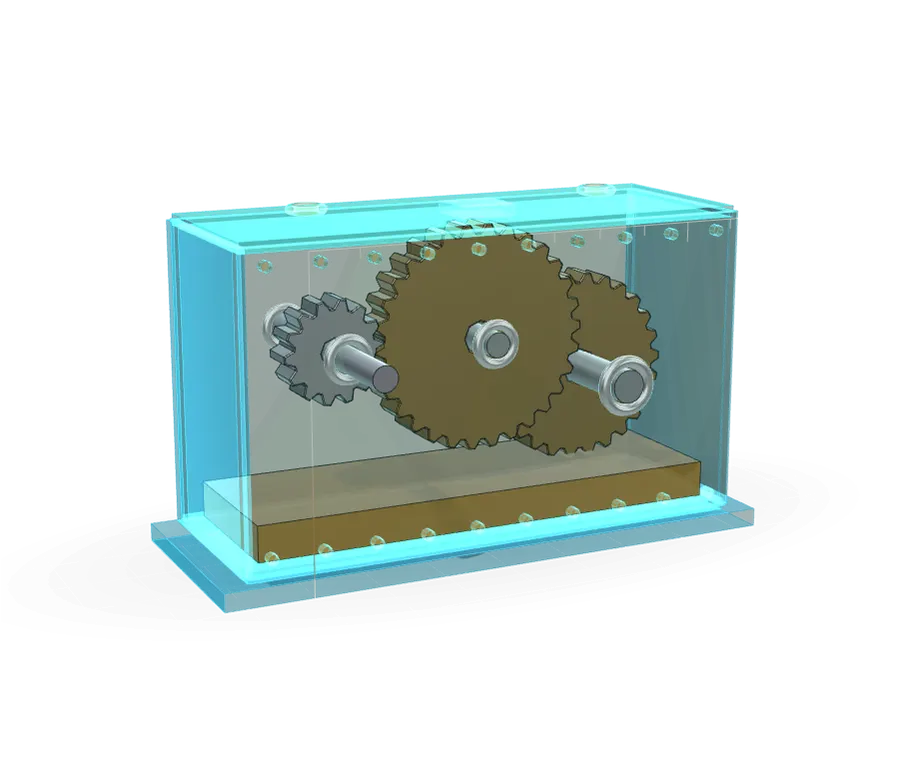
Cut through a housing or make it transparent to show the internals of a sealed product without opening a physical unit.
- 04
Component labels and hotspots
Label parts and attach specifications, benefits and documents to each component.
- 05
Real-scale AR placement
Place the configured product at 1:1 scale in the customer's space using a smartphone or tablet.
- 06
Built from manufacturer CAD
Beebox Studios works from your existing CAD and 3D data to create accurate, real-time 3D models.
- 07
Same assets in sales tools
Configured models can also be delivered to field sales and dealers through SalesBee, online or offline.
What is a 3D product configurator?
A 3D product configurator is an interactive 3D model of a product that the buyer can customise, changing colour, components and specification, and see the result immediately. Beebox Studios, an enterprise XR company in Chennai, India, builds configurators for industrial and engineered products that run in a web browser with no app install, built from the manufacturer’s own CAD and 3D data. They add the views that matter for technical products: exploded views, cross-sections, transparent mode, component labels and real-scale AR.
How does a 3D configurator work for industrial products?
A configurator has three parts:
- An accurate real-time 3D model, prepared from engineering CAD so that dimensions and part relationships are correct but light enough to run in a browser or on a phone.
- Configuration rules, which define which colours, components, attachments and specifications can be combined.
- A viewer, which lets the buyer rotate, zoom, change options and switch modes such as cross-section or AR.
For consumer products, the emphasis is usually on appearance. For industrial products, buyers also need to understand function: what is inside, how it fits together and whether it suits their site. That is why Beebox Studios treats exploded views, cross-sections and AR as standard parts of an industrial configurator rather than extras.
How do exploded view and cross-section animations help explain complex products?
They show what cannot be seen on the physical product. An exploded view animates the assembly apart, revealing internal components and the order in which they fit together, which helps engineers, maintenance buyers and procurement teams understand build quality and serviceability. A cross-section cuts through a housing to show internals in place. Transparent mode makes outer parts see-through while keeping context. Together they answer the question “how do I show the inside of a sealed product without cutting open a physical unit?” You can try a model with these interactions on the interactive demo page.
How do I let customers configure a machine online?
Publish a browser-based configurator on your website or share it as a link. Beebox Studios builds configurators where colour, component and specification change in real time in the browser. Each option can carry labels, specifications and documents, so the configured result doubles as a clear brief for the sales team.
How can a customer place a full-size machine in their facility before buying?
With real-scale AR on a standard smartphone or tablet. Beebox Studios’ real-scale AR app for a construction equipment manufacturer places a compact loader at real size on iPhone and iPad. Users can rotate the machine, move the lift arm and bucket, switch between attachments, view it at full or reduced scale, and use a measure tool for obstruction and collision checks.
How do you keep 3D models in sync with engineering changes?
Make the 3D model a managed product asset derived from engineering CAD, not a one-off marketing render. In practice that means agreeing which CAD release each model reflects, adding a model update step to the engineering change process, and publishing updates through one channel. When Beebox Studios delivers configurator models to field teams through SalesBee, updated content syncs to every rep’s device, so the website and the sales network show the same version.
What does a configurator project with Beebox Studios involve?
- Scope the options. List the colours, components, attachments and specifications buyers actually choose between, and the rules that link them.
- Prepare the 3D assets. Convert and optimise your CAD into real-time models, with each configurable part separated.
- Build the experience. Add configuration logic, exploded views, cross-sections, labels and AR.
- Publish. Embed on your website, share as a link, or deliver to field sales through SalesBee.
- Maintain. Update models when the specification changes.
How is a Beebox Studios configurator different from a generic configurator platform?
Generic configurator platforms are often strongest for retail and furniture, where appearance and pricing logic dominate. Beebox Studios focuses on engineered products where the buyer also needs to understand function, internals and fit. The team builds from manufacturer CAD with real-time engines such as Unity and Unreal and for the web, and can deliver the same assets to browsers, mobile AR and the SalesBee sales app. For the wider sales process around a configurator, see immersive sales enablement.
Products
The Beebox products behind it
Case studies
Proof in the field
- AR product demonstration · Industrial manufacturing
SalesBee AR catalogue for an electrical components manufacturer
Beebox Studios gave an electrical components manufacturer a SalesBee AR catalogue covering 900 SKUs. Field teams place components at real scale and show internal assemblies on a phone or tablet. The sales cycle shortened by 28% and US$1.2 million a year in sample logistics was eliminated.
Client name withheld - AR product demonstration · Construction and heavy equipment
Real-scale AR app for a construction equipment manufacturer
Beebox Studios built a native iPhone and iPad augmented reality app for a construction equipment manufacturer. Sales teams place a full-size compact loader in the customer's own space, operate its lift arm and bucket, swap attachments and measure clearances before a machine arrives.
Client name withheld
Industries
Where it is used
Manufacturing
3D demos, AR catalogues, operator training and plant twins for manufacturers
Heavy equipment
Real-scale AR machine demos, VR operator training and 3D service content
Construction & EPC
Interactive 3D models, AR site visualisation, wayfinding and facility twins
Oil, gas & energy
Live 3D plant twins, hazardous-procedure VR training and AR inspection
Insights
Further reading
- Product visualisation
How to build a virtual showroom for industrial equipment
A practical guide to building a virtual showroom for industrial equipment: choosing products, preparing CAD, interactions, devices and measuring results.
9 November 2026 · 8 min read - XR engineering
How to run a 3D product catalogue on a factory floor with no internet
How to run a 3D product catalogue offline on factory floors, get good XR performance on low-end Android devices, and protect CAD IP in shared apps.
7 November 2026 · 8 min read - Product visualisation
How do exploded view and cross-section animations help explain complex products?
How exploded view, cross-section and x-ray 3D views explain complex products, and how to show the inside of a sealed product without cutting open a real unit.
30 October 2026 · 6 min read
What is a 3D product configurator and how does it work for industrial products?
A 3D product configurator is an interactive 3D model with rules for which options can be combined. The buyer chooses colour, components or specification, and the model updates in real time. For industrial products, Beebox Studios adds exploded views, cross-sections, transparent mode and real-scale AR so buyers can see internals and check fit.
How do I let customers configure the colour, components and specification of a machine online?
Publish a browser-based 3D configurator on your website. Beebox Studios builds configurators from your CAD and 3D data that change colour, component and specification in-browser in real time, so customers can configure without installing an app.
How can I show the inside of a sealed product without cutting open a physical unit?
Use interactive cross-sections, transparent mode or an exploded view on an accurate 3D model. Beebox Studios builds all three, so buyers can see internal components and assembly order on a phone, tablet or browser.
How can a customer see a full-size machine in their facility before they buy it?
Use real-scale AR on a smartphone or tablet. Beebox Studios' real-scale AR app for a construction equipment manufacturer, for example, places a compact loader at real size, with movable arm and bucket, swappable attachments and a measure tool for obstruction checks.
How do you keep 3D product models in sync when engineering changes the specification?
Treat the 3D model as a product asset derived from engineering CAD, with an owner and an update step in your change process. When the specification changes, Beebox Studios updates the model from revised CAD and republishes it; content delivered through SalesBee then syncs to devices.
Does Beebox Studios build configurators from manufacturer CAD?
Yes. Beebox Studios works from your existing CAD and 3D data to create real-time 3D models for configurators, sales apps and AR. Share your source data early so the team can confirm the conversion approach.
Next step
See your own product in 3D, AR or VR
Send us a CAD file, a drawing or a product brochure. We will show you what an interactive 3D demo, a VR simulation or a live digital twin of it could look like.
Or call +91 87544 83451