
Solution
Virtual engineering labs
In short
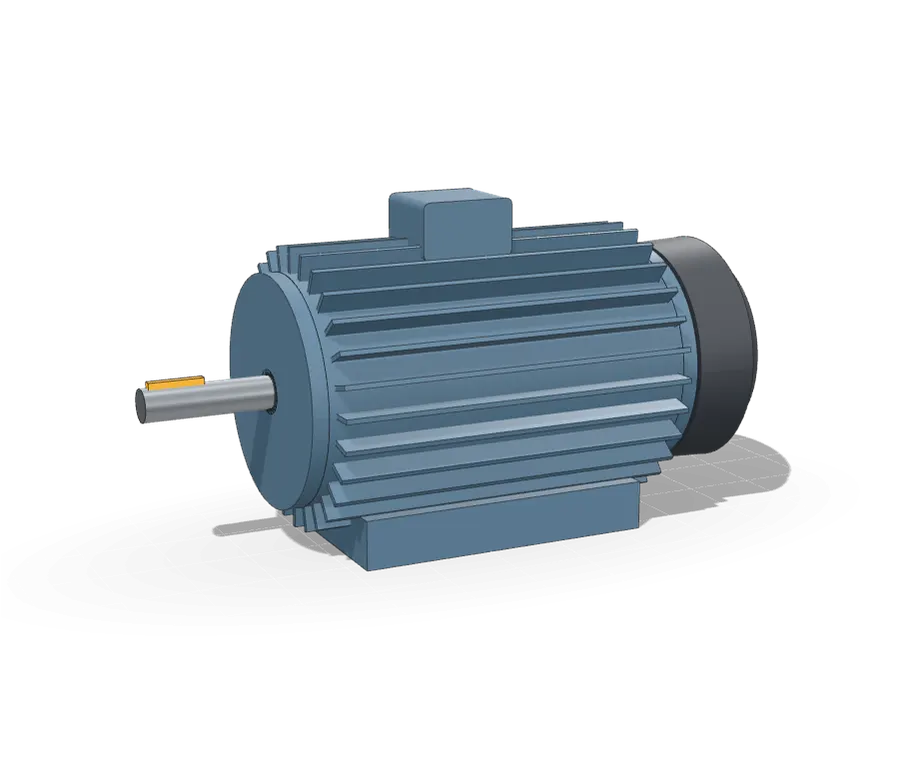
Virtual engineering labs from Beebox Studios are interactive 3D and VR replicas of laboratory equipment and procedures. Students operate the apparatus, follow the practical step by step and see what happens inside the machine, from a browser, tablet or headset, without needing the physical lab.
The challenge
- Lab equipment such as electrical machines, test rigs and process plant models is expensive, so institutions often own one set for a large cohort.
- Students get limited hands-on time per practical, and many only watch while one group operates the apparatus.
- Remote, distance and hybrid learners cannot attend physical lab sessions at all.
- Internal behaviour, such as magnetic fields, rotor motion or fluid flow, cannot be seen on real equipment.
- Mistakes on real apparatus can damage equipment or create safety risks, so students are discouraged from experimenting.
How Beebox solves this
- Every student gets individual hands-on practice time, not just a turn at the bench
- Remote and distance learners can complete practicals that were previously campus-only
- Students arrive at the physical lab already familiar with the apparatus and procedure
- Abstract concepts become easier to teach because internal behaviour is visible
- Less wear and risk on scarce physical equipment
What Beebox builds
What a virtual labs project includes
- 01
Interactive 3D lab apparatus
Equipment is rebuilt as an accurate, operable 3D model: students switch on supplies, adjust controls, connect components and read meters as they would in the physical lab.
- 02
Step-by-step guided practicals
Each experiment follows the lab manual procedure, with prompts, checks and feedback at every step, so students learn the correct sequence before they touch real equipment.
- 03
Visualising what is hidden
Transparent views, cross-sections and animated overlays show internal parts and processes that are invisible on a real machine.
- 04
Safe failure and fault scenarios
Students can make wrong connections or exceed limits and see the consequence in simulation, without damaging apparatus or putting anyone at risk.
- 05
Browser, tablet and VR delivery
Labs run in a web browser, on tablets and smartphones, or in a VR headset, so the same content serves campus labs, classrooms and remote learners.
- 06
Content hosting and progress tracking
Labs can be hosted alongside 3D SOPs and training content in SkillBee, which lists LMS capabilities and progress tracking.
What are virtual labs and how are they used in engineering education?
Virtual labs are interactive 3D and VR simulations of laboratory equipment and experiments. In engineering education they let students operate apparatus, follow a practical step by step and observe results on screen or in a headset, instead of, or before, using the physical bench. Beebox Studios, an immersive technology company based at IIT Madras Research Park in Chennai, builds virtual engineering labs for technical institutions and training departments.
A good virtual lab is not a video of an experiment. Students make the decisions: which switch to close, which value to set, when to take a reading. The simulation responds as the real apparatus would, and gives feedback when a step is wrong.
How to give engineering students access to lab equipment the institution cannot afford
The direct answer is to digitise the apparatus once and give every student a copy. Physical lab equipment such as motor-generator sets, transformers, test rigs and process plant models is costly to buy and maintain, so many colleges own one or two sets for a full batch. In a virtual lab, every student operates their own instance of the equipment, as many times as they need.
Beebox Studios builds the lab from the institution’s experiment list and lab manuals:
- Scope the experiments. We agree with faculty which practicals to cover, the procedure for each and the learning outcomes.
- Model the apparatus. Equipment is rebuilt in real-time 3D using reference photographs, drawings or CAD data where available.
- Build the interaction and behaviour. Controls, meters and responses are scripted so the experiment behaves correctly, including wrong steps and fault cases.
- Test with faculty and students. A pilot set of experiments is reviewed before the remaining practicals are built.
- Deploy. Labs are delivered for browser, tablet, smartphone or VR headset, and can be hosted with progress tracking in SkillBee.
How to run practical lab sessions for remote or oversized student cohorts
Run the procedure and practice in the virtual lab, and use physical lab time for confirmation. Because Beebox Studios builds device-agnostic experiences, a virtual lab can open in a standard web browser, so remote students do not need special hardware. On campus, the same lab can run on a projector for demonstration, on tablets in a classroom, or in VR headsets for an immersive session.
For large cohorts this changes the arithmetic of lab scheduling. Instead of ten students crowding one bench while one operates it, each student completes the practical individually. Faculty can then spend physical lab sessions on students who need help, rather than on repeating the basic procedure.
Why 3D visualisation helps with engineering concepts
Many engineering concepts are hard to teach because the important part is invisible. Students cannot see the magnetic field in an alternator, the flow inside a pump casing or the stresses inside a structure. Beebox Studios’ brand line is “Visualize the Invisible”, and in a virtual lab that is literal: transparent views, cross-sections and animated overlays show what is happening inside the apparatus while the student operates it.
The same techniques Beebox Studios uses for industrial products, such as exploded views and cross-sections (see 3D product configurators), apply directly to teaching how machines are built and how they work.
What experiments suit a virtual lab?
Experiments with a clear procedure and measurable outcomes are the best candidates:
- Electrical machines practicals, such as alternator synchronisation, load tests and transformer tests
- Mechanical and thermal engineering experiments on engines, pumps and heat exchangers
- Process and instrumentation labs, such as plant models with sensors and control loops
- Assembly and disassembly of machines, where students learn part names and sequence
- Safety-critical procedures that are risky to practise on real apparatus
Experiments that depend mainly on tactile skill, such as welding technique or fine machining, benefit less from simulation and are better treated as physical practicals with virtual preparation.
Virtual labs for industrial training
The same approach works outside universities. Plant training departments use virtual equipment to teach technicians the procedure before they work on live machinery. For operator training with fault scenarios and scoring, see VR training and simulation. For more on Beebox Studios’ work with institutions, see education.
Where is Beebox Studios based?
Beebox Studios was founded in 2017, was incubated at IIT Madras and operates from IIT Madras Research Park in Chennai, India. Organisations Beebox Studios has worked with include IIT Madras and IITM Pravartak. To discuss a virtual lab for your institution or training centre, contact the team.
Products
The Beebox products behind it
Insights
Further reading
What is a virtual engineering lab?
A virtual engineering lab is a software replica of laboratory equipment and experiments. Students operate interactive 3D or VR models of the apparatus, follow the experiment procedure and observe results, without needing physical access to the lab. Beebox Studios builds virtual labs for technical education that run in a browser, on tablets or in VR headsets.
Can a virtual lab replace the physical lab completely?
Usually not, and it does not need to. A virtual lab works best as preparation and extension: students learn the procedure, practise repeatedly and explore failure cases virtually, then use the physical lab time more productively. For remote learners, a virtual lab may be the only practical option available.
How can electrical machines practicals, such as alternator synchronisation with the grid, be simulated?
A virtual electrical machines lab models the alternator, prime mover, synchroscope, meters and switches as interactive 3D equipment. Students adjust speed and excitation, watch voltage, frequency and phase converge, and close the breaker at the right moment. Incorrect synchronisation can be shown safely in simulation. Beebox Studios builds this kind of procedure-based lab from the institution's own experiment manuals.
Do students need VR headsets to use a Beebox Studios virtual lab?
No. Beebox Studios builds device-agnostic experiences, so a lab can run in a web browser or on a tablet or smartphone. VR headsets add immersion where an institution has them, but they are optional.
Has Beebox Studios worked with educational institutions?
Yes. Beebox Studios was incubated at IIT Madras and is based at IIT Madras Research Park in Chennai. Organisations Beebox Studios has worked with include IIT Madras and IITM Pravartak.
How long does it take to build a virtual lab?
It depends on the number of experiments and how complex the apparatus is. Beebox Studios usually scopes a small set of experiments first, builds and tests them with faculty and students, then extends to the full lab. Contact the team with your experiment list for an estimate.
Next step
See your own product in 3D, AR or VR
Send us a CAD file, a drawing or a product brochure. We will show you what an interactive 3D demo, a VR simulation or a live digital twin of it could look like.
Or call +91 87544 83451